Typing and IME in No Results Found
The index wants the glyphs on screen. Full-width input is a desk bug, not a missing clue.
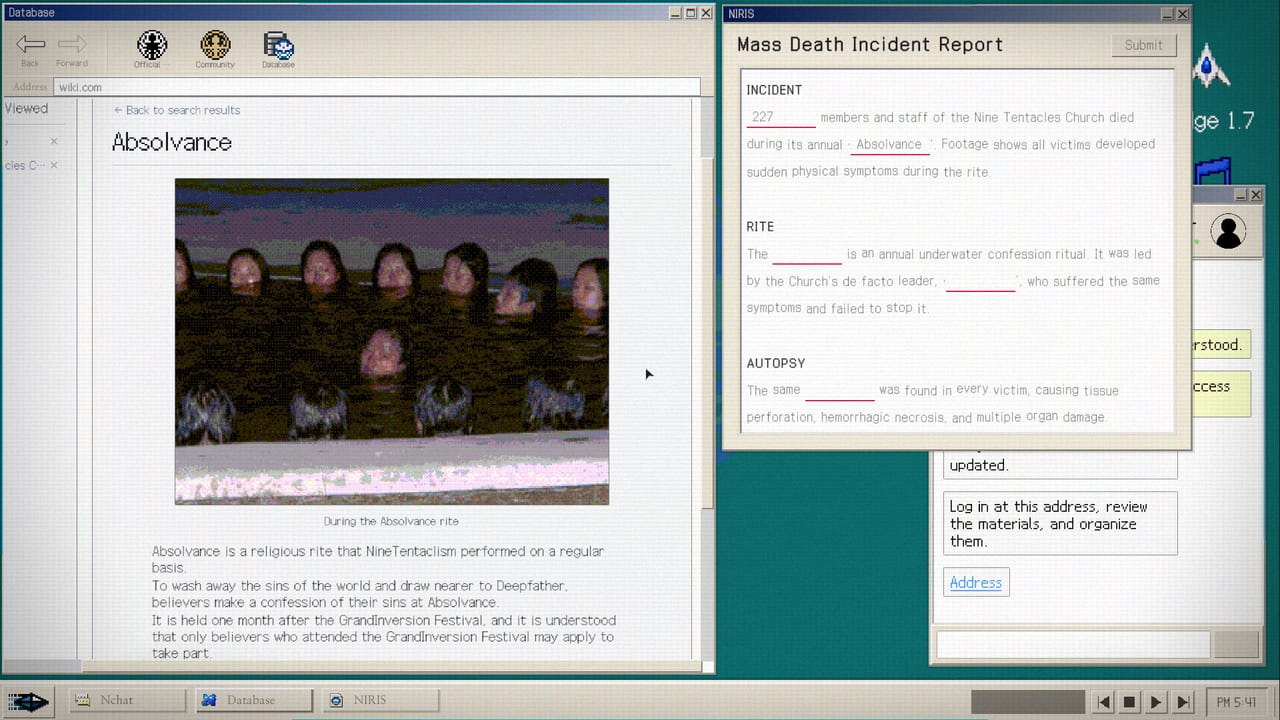
No Results Found is a typing desk. Almost every lock is a string you put into a simulated search bar or a report blank. English players bounce on extra spaces and Marco versus Makor. Japanese and Korean players bounce on something nastier: the input method. Japanese clear notes published after launch are blunt. Half-width characters work. Full-width input can freeze the older client. The writer copied every keyword from the in-game memo and pasted it. That is not a style tip. It is how you keep the NIRA browser alive.
This page is the keyboard file. How to Search stays on what to copy. Controls stays on 16:9 and the 1.0.1 input-field patch. Known Issues stays on crashes and unsaved notes. Here we talk about IME, paste, one-word queries, and the windowed-mode workaround that Patch 1.2 made less painful.
Confirm you are on 1.2 before you assume the field is haunted. 1.0.1 improved input-field logic. 1.1 fixed browser and UI bugs. 1.2 lets you resize the outer window in Windowed Mode even though the internal layout stays fixed. Japanese blogs say that switching to windowed from the in-game control panel also made full-width input behave. Treat that as a recovery step, not as permission to type 全角 all evening.
Half-width, Hangul, and what the index actually stores
The authored dataset stores specific glyphs. A Japanese lemma printed in half-width Latin, a Korean Hangul handle, and an English baptismal name are three different keys. Translating a Korean nickname into English and pasting the gloss is how you get a genuine empty page. The title of the game is that joke.
If the UI is Japanese, copy the Japanese string. If the UI is Korean, copy the Korean string. If you swapped language mid-run, search the form the live client prints now. Patch 1.0.2 fixed Japanese mistranslations and widened report answers. A launch-week screenshot of a job title can be stale. Re-copy.
Hangul IME is usually safer than Japanese full-width Latin, because Korean letters are the intended glyphs for Korean posts. The failure mode for Korean players is extra particles, spaces, and English glosses, not 全角. Still paste from the memo. Still search one token. Japanese writeups insist on one-word search. A second word is how a good lead dies.
Simplified and Traditional Chinese arrived in 1.2 as game-client languages. This wiki does not ship a Chinese locale. If you launched Chinese, copy those glyphs the same way. Do not mail zzangdolgames@gmail.com asking this English wiki to type them for you. See Languages.
Why the memo is a clipboard
Write First, Think Later is an achievement, but the notepad is also the paste buffer the Japanese walkthroughs rely on. Highlight a token in a post. Drop it in the memo. Paste it into the community search field. Do not retype from memory. Caps lock, an extra space, and a full-width digit that looks like 0909 instead of 0909 are three ways to freeze or miss.
Locked public posts use a four-digit password that repeats on Church copy. Players publish 0909. Type it half-width. If the field eats the first keystroke, click the field again. That is the 1.0.1 class of bug, documented on Controls. If the whole window stops accepting keys after a 全角 commit, screenshot, alt-tab out, and switch the game to windowed. Then paste from the memo. Mail support only if 1.2 still hard-locks.
The embedded video is a real Japanese investigation session, not a trailer still. Watch how the player treats the bar as a puzzle field. Then paste on your own desk.
Report blanks and autocomplete quirks
Japanese notes also say that mashing one character can autocomplete a known report field when you talk to the supervisor. That is a quality-of-life quirk, not a third ending. It does not replace copying Pallidum, Volax, or a ledger title from the encyclopedia. Wiki Blanks and Investigation Reports still want the in-world lemma. Full-width punctuation in a chemical name is how a widened 1.0.2 acceptor still rejects you.
DODGE is a different keyboard. Arrow keys dodge bullets in a tiny window. That skillset is the opposite of IME hygiene. Do not open the minigame to “test” whether typing still works. See How to Beat DODGE after you file.
What this page will not do
It will not print selcatnetenin.com. That sits on Search Keywords. It will not list baptismal names. That sits on Baptismal Names. It will not raise Closer to the Truth. Reading the board sits on Closer to the Truth.
It will keep you from treating a frozen field as a missing cult URL. Update Steam. Set the IME to half-width alphanumeric for Latin tokens. Use Hangul or kana only when the screen actually shows those glyphs. Paste from the memo. Resize the window on 1.2 if the client fought you. Then search the token that was already on screen.
Sit at a real keyboard. A Steam Deck on-screen keyboard makes every trap in this file worse. Steam Deck is still unverified. Family Sharing is listed. A second player is not. Play it alone, with paste, on a desk that does not freeze when you hit 全角.
If a later patch names an IME fix in Steam news, this page will say so. Through 1.2 the official notes never used the word IME. The freeze lives in player blogs. Wiki it as a desk habit, not as a promised Valve badge.
Frequently Asked Questions
Quick answers for investigators who just hit a dead search.
Why does Japanese input freeze the search field?
Full-width characters can lock older builds. Copy half-width tokens from the memo and paste. Windowed mode on patch 1.2 is the recovery step.
Should I type Hangul or English for Korean posts?
Copy the glyphs the live UI prints. A translated English gloss of a Korean handle is a dead search, not a localization feature.
Is pasting allowed?
Yes. Japanese clear notes treat the memo as a clipboard. Retyping 0909 as full-width digits is how the lock fails.