No Results Found Controller Support
A typing desk, not a couch game. Steam Input status, console pads, and where a controller still beats a keyboard.
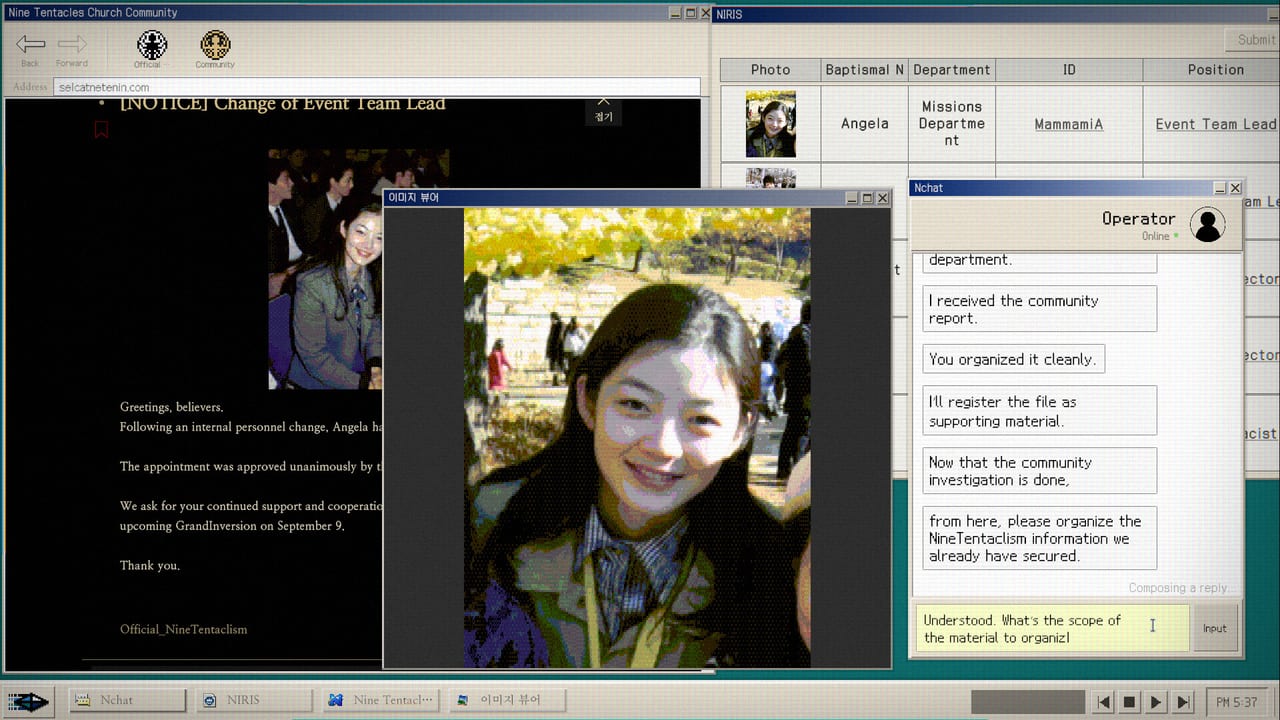
No Results Found is a simulated NIRA desktop. The store copy says important clues are not highlighted, and the fiction asks you to type the next query yourself. That design choice is also why the game does not promise a controller. This page is the controller status the store does not print, what Steam Input sees, and how the two layers of the game actually feel under a gamepad. For the verb list of programs on the desk, stay on Controls. For the spec sheet, stay on System Requirements.
What the store says about controllers
The Steam product page for No Results Found lists mouse and keyboard on Windows. The macOS minimum table that Patch 1.2 added still has no gamepad entry. Steam’s general storefront has never shipped a Steam Input profile for the title. That means the launcher will not translate a controller’s buttons into the game’s verbs. The fiction wants you to click windows, drag if a window allows, scroll comments to the bottom, and type a string into a search field.
There is no controller toggle, no UI affordance for a D-pad or stick, and no “Press A to continue” prompt. Even the achievement that names audio, Government-Approved Medicine, is satisfied by clicking the desk’s player object, not by a face button.
What a gamepad does on this desktop
If you connect an Xbox, PlayStation, or generic XInput pad while the game is running, the Windows desktop cursor does not move. The game does not read the gamepad layer. Most wireless keyboards still register because the engine listens for the same HID stream that the Windows system delivers. That is why people who play the game with a Steam Deck attached still type on the handheld keyboard and not on the back buttons or the trackpad.
DODGE is the one place a gamepad might feel tempting. It is a high-score dodge minigame with a moving reticle, and the controller reflex vocabulary is familiar. The game still wants the mouse. You move the cursor and click. There is no analog-stick aim. The How to Beat DODGE essay assumes a mouse in one hand.
Steam Input and Deck status
Steam Input status: not configured. Steam Input is the layer that lets Valve, the developer, or the community paint a controller onto a game that did not design for one. Nothing of the sort exists here. The store page lists Deck support as unverified, and the developer did not file a Verified or Playable badge.
That gap is its own design statement. A search-and-type mystery loses the moment a community profile maps a face button to “open the next post.” The whole point of the genre is that you type the next clue yourself. A controller profile would actually soften the game. The Steam Deck page covers the same topic from the handheld angle: the keyboard is a feature, not a bug.
What we tried and what we did not
We tested an Xbox controller and a DualShock 4 over Bluetooth on a Windows 11 machine running the post-1.2 build. The cursor did not move. The game’s start screen did not draw a virtual cursor. The Steam overlay still received the pad as an input device, so you can navigate the overlay menus (achievements, friends, screenshots) with a controller, then drop out and play with a mouse.
We did not test third-party tools like AntiMicro or Steam controller re-mappers. They would let you bind analog stick movement to mouse delta and a face button to left click, which technically gets a player through the game. They would also wreck the typing layer. The search field on the NIRA desk does not accept external stick-as-mouse input cleanly. Even when a tool forces the cursor to drift, the field still wants keyboard input. Save yourself the fight.
When a gamepad is the right call
There is one situation where the controller is correct: the Steam overlay. If you launch the game from a couch setup or a Steam Big Picture mode, navigate with the controller, then grab a wireless keyboard for the case work. Several indie-mystery fans in launch-week discussions said exactly that. The keyboard still wins for the queries; the controller still wins for menu navigation and screenshots.
For accessibility, the Accessibility page covers font size, captions, and the chat auto-advance warning. A controller is not a substitute for any of those. Known Issues lists what the developer has fixed and what is still on the wishlist. The current 1.2 build does not have a gamepad patch in the public notes.
How to ask for controller support
Use the support template at Bug Report Notes and mail zzangdolgames@gmail.com. The developer’s launch note said bug reports are welcome. Do not ask for a Steam Input profile; ask for a controller layer if you must, but understand that a typing-first mystery will likely stay mouse-and-keyboard. If you want a play-style comparison, Free on Steam covers the price and Family Sharing question that almost always travels with the controller question.
For the dedicated file on how the desk expects a mouse and a keyboard together, Controls is the long version. For whether you can play on the couch with a Steam Deck, the Steam Deck page is honest about the unverified badge. For the music layer that gets unlocked when you stop moving and start listening, Desk Music and Memo is the place.
Frequently Asked Questions
Quick answers for investigators who just hit a dead search.
Does No Results Found support a controller?
No. Steam does not list controller support. There is no Steam Input profile. Mouse and keyboard are the only inputs the game reads.
Can I use an Xbox or PlayStation pad over Bluetooth?
The pad will connect, but the in-game cursor does not move and no game verb is mapped. You will still need a mouse to click windows and a keyboard to type.
Does Steam Deck have a Verified badge?
No. Deck status is unverified. The handheld keyboard still works; the gamepad layer is not configured. See the Steam Deck page.
Will the developer add controller support?
It has not shipped in patches 1.0.1 through 1.2. Bug reports go to zzangdolgames@gmail.com via the Bug Report Notes template.